Creating Romantic Art with Valentine's Dachshund Procreate Stamps
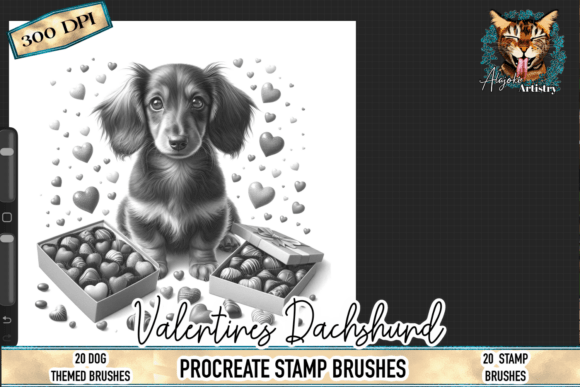
There is a specific kind of joy that comes from combining two beloved subjects: the whimsical charm of dachshunds and the warmth of Valentine's Day. For digital artists, planners, and small business owners, the Valentine's Dachshund Procreate Stamps offer a shortcut to creating high-quality, heartwarming illustrations without needing to draw every whisker from scratch. These brushes feature adorable long-haired dachshunds surrounded by hearts, chocolates, and sweet romantic details, designed specifically for the iPad ecosystem. However, diving into digital stamping requires more than just a download; it demands an understanding of how to integrate these tools effectively to avoid common pitfalls that can dilute the quality of your final product.
Many creators rush into purchasing digital assets without verifying compatibility or considering their workflow needs. A frequent misunderstanding involves the versatility of these files. It is crucial to remember that this set is created exclusively for Procreate on iPad. Unlike standard PNG clipart that can be dragged into Photoshop, Canva, or Illustrator, these are functional brush files. Attempting to use them in other software will result in frustration and wasted time. Before you buy, ensure your primary design environment is the Procreate app. If your workflow relies heavily on desktop-based vector programs, you may need to look for SVG alternatives or plan to export your Procreate work as high-resolution images before moving them elsewhere.
Avoiding Resolution and Scaling Errors
One of the most significant mistakes beginners make with stamp brushes is ignoring resolution limits. While the Valentine's Dachshund Procreate Stamp Brushes are high-resolution, they are not infinitely scalable like vectors. When you tap a stamp onto your canvas, it renders at a specific pixel density based on your canvas size. If you create a tiny canvas and then try to stretch a stamped wiener dog to fill a poster-sized layout, the image will become pixelated and blurry. This directly affects the professionalism of your output, especially if you are creating items for sale like sublimation prints or large wall art.
To avoid this, always set up your Procreate canvas at the final intended size and resolution (typically 300 DPI for print) before you start stamping. If you need a larger version of a specific dachshund illustration, it is better to stamp it on a separate, larger canvas and import it as a photo layer rather than stretching it within a small document. This simple precaution ensures your romantic dog stamp set maintains crisp edges and clean details, preserving the integrity of the artwork whether it ends up on a tumbler or a greeting card.
Maximizing Efficiency Without Losing Creativity
The convenience of "one-tap use" is a double-edged sword. Because these Cute Wiener Dog Love Illustrations are so easy to apply, there is a temptation to overuse them or place them randomly without thought. This can lead to designs that feel cluttered or generic. A common error is stacking too many elements—hearts, chocolate boxes, and multiple dogs—in a single composition without considering negative space. The result is often a visual mess that distracts from the main message of your design.
A better approach is to treat these stamps as building blocks rather than the entire structure. Use the Romantic Dog Stamp Set to accentuate your hand-lettering or to frame a central focal point. For instance, if you are designing a Valentine's planner page, place a single long-haired dachshund in a corner and use the smaller heart accents to create a subtle border. This creates balance and allows the charm of the illustration to shine without overwhelming the viewer. Remember, efficiency should speed up your process, not replace your artistic judgment.
Commercial Use and Product Application
For entrepreneurs and small business owners, understanding the licensing and application of these digital downloads is vital. Many users purchase assets like the Valentine's Dachshund Procreate Stamps intending to sell physical products like mugs, shirts, or stickers, but they overlook the preparation required for different mediums. Sublimation, for example, requires mirrored images. Since these are brushes, you must remember to flip your canvas or the specific layer before exporting your design for heat transfer; otherwise, your text and asymmetrical dog poses will appear backward on the final product.
Additionally, when creating stickers or clipart for sale, ensure you are removing the background correctly. While Procreate handles transparency well, exporting for print-on-demand services often requires specific file formats like PNG with transparent backgrounds. Do not simply screenshot your design. Instead, hide the background layer in Procreate and share the file as a PNG to maintain the clean, professional results promised by the high-resolution stamps. Failing to do so can lead to white boxes around your cute illustrations, which looks unprofessional on colored merchandise.
Checklist Before You Start Designing
To ensure you get the most out of your purchase and avoid costly mistakes, run through this quick mental checklist before opening your app:
- Verify Software: Confirm you have Procreate installed on an iPad. These brushes will not function in Photoshop, Procreate Pocket, or desktop applications.
- Set Canvas Dimensions: Establish your final output size and 300 DPI resolution immediately to prevent pixelation later.
- Plan Your Composition: Sketch a rough layout to decide where the dachshund stamps and romantic accents will go, avoiding overcrowding.
- Check Licensing Terms: Review the specific license included with the download to confirm rights for commercial use, especially if selling physical goods like tumblers or cards.
- Test Export Settings: Do a test print or export to ensure colors and transparency look correct before committing to a large batch of products.
Ultimately, falling in love with this Valentine's Dachshund Procreate Stamp Brush Set is about more than just the adorable imagery; it is about integrating a tool that enhances your workflow while maintaining high standards. By respecting the technical limitations of raster brushes, planning your compositions thoughtfully, and preparing your files correctly for their intended medium, you can create lovable artwork that resonates with dog lovers and romantics alike. Whether you are a hobbyist making cards for friends or a marketer launching a Valentine's collection, these detailed stamps provide a solid foundation for success—provided you use them with intention and care.
Remember, this is a digital download, meaning no physical product will be shipped. The value lies entirely in how you wield these tools within your creative process. Take the time to learn the nuances of the brush engine, experiment with layer blending modes to integrate the chocolates and hearts seamlessly, and enjoy the process of bringing these charming puppy artworks to life with a single tap.